White paper Achieving NIS2 compliance
How the OFFPAD secures your path to conformaty
Need more convincing before placing your order? Check this out
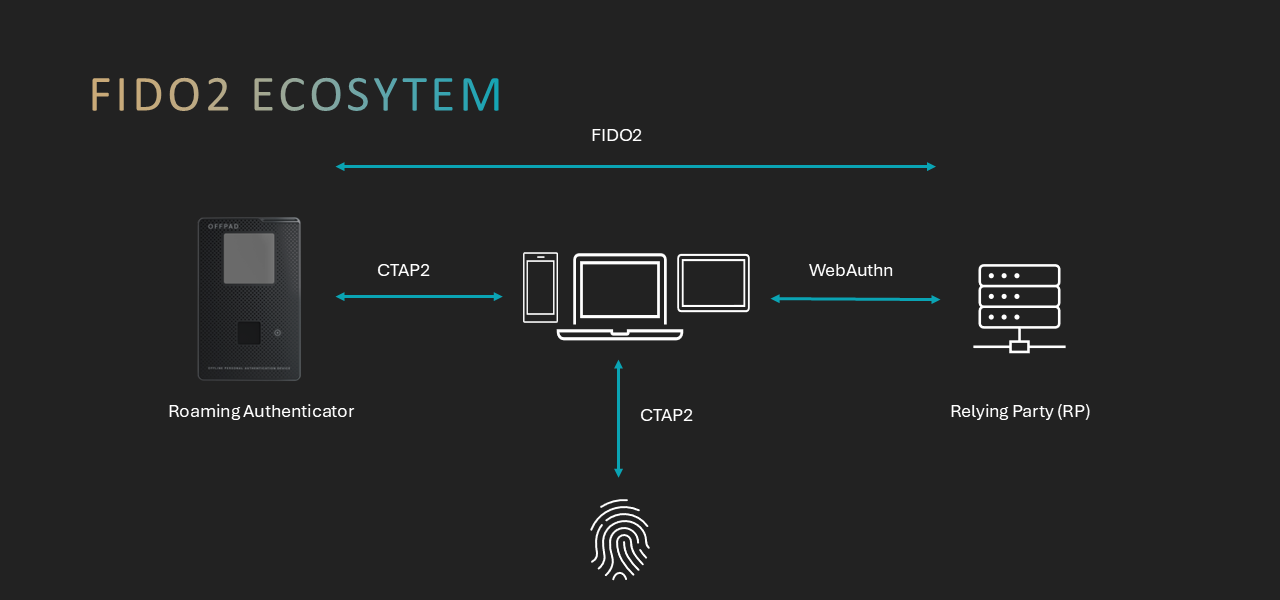
For decades, passwords have been the way we authenticate ourselves online—but they are also one of the biggest security headaches. They are frequently reused, easily forgotten, and vulnerable to phishing attacks. These issues create security risks for organisations and inconvenience for users.
To address these challenges, the industry has introduced a modern and more secure alternative: FIDO2 passkeys. Passkeys eliminate the need for passwords and offer a simpler, more reliable way to sign in.
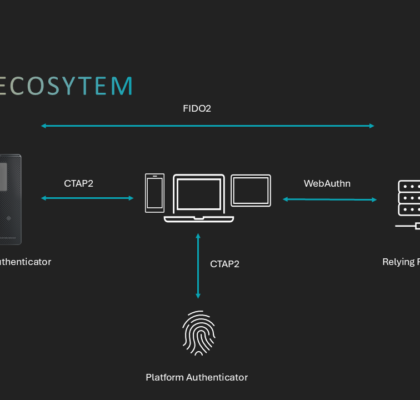
FIDO2 is an open authentication standard developed by the FIDO Alliance and the World Wide Web Consortium (W3C). It is composed of two parts:
WebAuthn is a web standard that allows browsers and applications to use strong, passwordless authentication.
CTAP (Client‑to‑Authenticator Protocol) enables devices such as smartphones, laptops, and security keys to communicate with authenticators. FIDO2 uses public‑key cryptography.
When a user registers on a website, the device creates a pair of keys: a public verification key stored by the service and a private signing key that stays on the user’s device and is never shared. Whenever a user logs in to a service, they generate a context-specific, non-sensitive signature that the server can verify. This design prevents phishing by avoiding the transmission of secrets and ensuring that each passkey is unique to the service where it was created.These private signing keys are called passkeys.
Passkeys can be handled in two ways:
Synced Passkeys
Some platforms allow passkeys to synchronise across devices using cloud services. This is convenient for users who frequently switch devices. A passkey can be bound to a single user device or automatically synced across a user’s multiple devices through a cloud service.
Device‑Bound Passkeys
Device‑bound passkeys stay on the device where they were created and cannot be exported or synced. They offer: Strong hardware‑anchored security Protection from cloud account compromises Better compliance for regulated industries This approach aligns with FIDO’s core principle that each passkey is unique to the site where it was created and that biometric data never leaves the device.
Although FIDO2 uses advanced cryptography, the actual sign‑in experience is simple:
Registration
– The website asks the user to create a credential.
– The device generates a key pair specific to the application, consisting of a public verification key and a private signing key, known as the passkey.
– The public key is sent to the website, and the private key remains on the device.
Authentication
– The website sends a one‑time challenge.
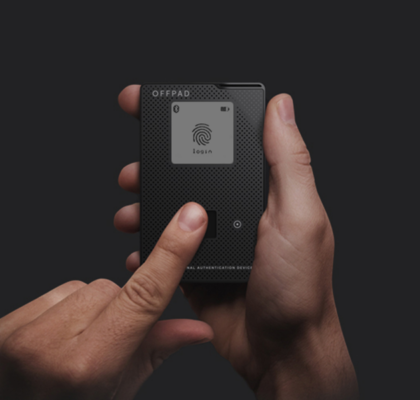
– The user unlocks the device with a biometric check or PIN.
– The device signs the challenge with the private key.
– The website verifies the signature using the stored public key.
Because your private key never leaves your device, attackers have nothing to steal—no passwords to phish, guess, or reuse.
To understand why passkeys are a major improvement, it helps to compare them with traditional passwords:
1. Security
– Traditional passwords can be stolen through phishing, reused across multiple sites, guessed, or leaked in data breaches.
– Passkeys are phishing‑resistant because the private key never leaves the device and cannot be used on any other site.
2. User Experience
– Passwords must be created, remembered, typed, updated, and often reset.
– Passkeys require no typing or memorisation—users simply authenticate by unlocking their device with biometrics or a PIN.
3. Privacy
– Passwords are shared secrets stored on servers, making them targets for attackers.
– Passkeys rely on cryptographic pairs where only the non‑sensitive public key is stored by the service, and biometric information never leaves the device.
4. Cross‑Site Risk
– Traditional passwords can be reused across multiple sites, so one breach can compromise many accounts.
– Passkeys are unique to each site and cannot be reused elsewhere.
5. Compliance and Assurance
– Passwords vary widely in strength and often fail to meet stricter enterprise security needs.
– Device‑bound passkeys provide hardware‑anchored, high‑assurance authentication ideal for regulated industries.
FIDO2 and passkeys provide a more secure, user‑friendly, and privacy‑protective alternative to traditional passwords. Device‑bound passkeys offer strong protection anchored in secure hardware, making them well-suited for organisations with high security requirements. As adoption of passkeys across consumer and enterprise systems grows, they are becoming the new standard for secure, seamless digital authentication.